Challenge C: Open Educational Resource
Recycling for Kids
Updated: November XX, 2025
Authors: Bashar Kabd, Neeraj Neeraj & Therese Taruc
The Challenge C is a blog post documentation of the process we took to create an Open Educational Resource (OER) about Recycling. This learning pod consists of three pod members: Bashar Kabd, Neeraj Neeraj, and Therese Taruc. We chose Recycling because it is an interesting topic that we were all acquainted with, and we wanted to create a site that examined recycling in a more thorough fashion. Our goal is to get a better idea of how recycling works, and create a website that can educate others on recycling. Overall, we are thrilled to show the results of our effort, and see how our website turns out in the end.
THE PROCESS
Understand (Discover, Interpret, Specify)
DESCRIBE THE CHALLENGE:
Children need to learn what recycling is, how to do it properly, and why it matters for the environment. By understanding how their actions make a difference, they can build good habits by keeping their home, school, and the planet clean.
CONTEXT AND AUDIENCE:
Audience
Our typical audience is made up of elementary-school students (aged 5-12 years old). Learners will be able to access the website on any browser as part of a class assignment or through in-class activities. Some extreme audience cases include learners with learning difficulties, as well as visual or auditory problems.
Needs
Learners completing this assignment or activity will need to skim over the website and read through text and educational resources and complete minigames to learn more about recycling. For learners with sight issues, the learners can use chrome extensions to create captions from the text on the website, then read them out loud. Visual aim assistants can help with minigames. For learners with learning difficulties, the simplicity of the website and the minigames can make the material easier to understand, and educators can additionally help by explaining it.
Goals
The goal for learners is to complete the assignment or activity by learning how to recycle, and why they should recycle. This will help them develop better social and sanitary habits, and increase social cleanliness.
Motivations
Learners will feel motivated to complete the assignment or activity because the website will feature multimedia design principles that pique their interest. This includes well segmented information, minigames, no redundancies, and easy to understand information.
POV STATEMENT:
An elementary school student learning about recycling needs fun and easy-to-understand activities so they can learn how to recycle properly and feel inspired to help the environment.
LEARNING OBJECTIVES: [INCOMPLETE]
- Specify the learning objectives and sub-objectives for your project. Try and get below the surface – do you have any ‘secret’ learning objectives (i.e. promote an interest x, meta-cognitive skills)? I enjoy this resource to help with making learning objectives: https://learning-objectives.easygenerator.com/
Note: This phase focuses on understanding the learning need, not on the multimedia resource you plan to create.
Plan (Ideate, Sketch, Elaborate)
IDEATION:
The main point of focus during our brainstorming process was to identify central concepts of recycling in a format that would be engaging and educational for elementary school students. The communication between us happened through google docs and group chat discussions, at the same time we also used Google jamboard to put our ideas visually and discuss it. In our discussion sessions various types of formats were discussed such as videos, interactive quizzes, and small interactive games explaining the principles of recycling. For this particular topic we decided to create a website with mini-games and interactive visuals. We chose this type of multimedia because it allows us to include multimedia elements of different types while keeping the learners experience playful, engaging, and memorable.
We all decided to divide the idea of recycling into three main sections for reducing cognitive load, these sections are What is Recycling, Why it Matters, and How to recycle properly. In the website we decided to create an interactive section which will include sorting games to distinguish recyclable and non-recyclable items. This section will allow students to learn the core principles of recycling as well as practice making the learning experience more engaging and easy to understand. Another reason for choosing the website format is that it aligned effectively with Mayer’s Multimedia principles such as segmenting, coherence, while giving the students ability to learn on their own speed and creating content and structure clear and modular. To ensure the needs of learners from different abilities and backgrounds, we made sure that our idea was educational, clear and engaging so that every student can participate in learning meaningfully.
STORYBOARD OR SCRIPT:
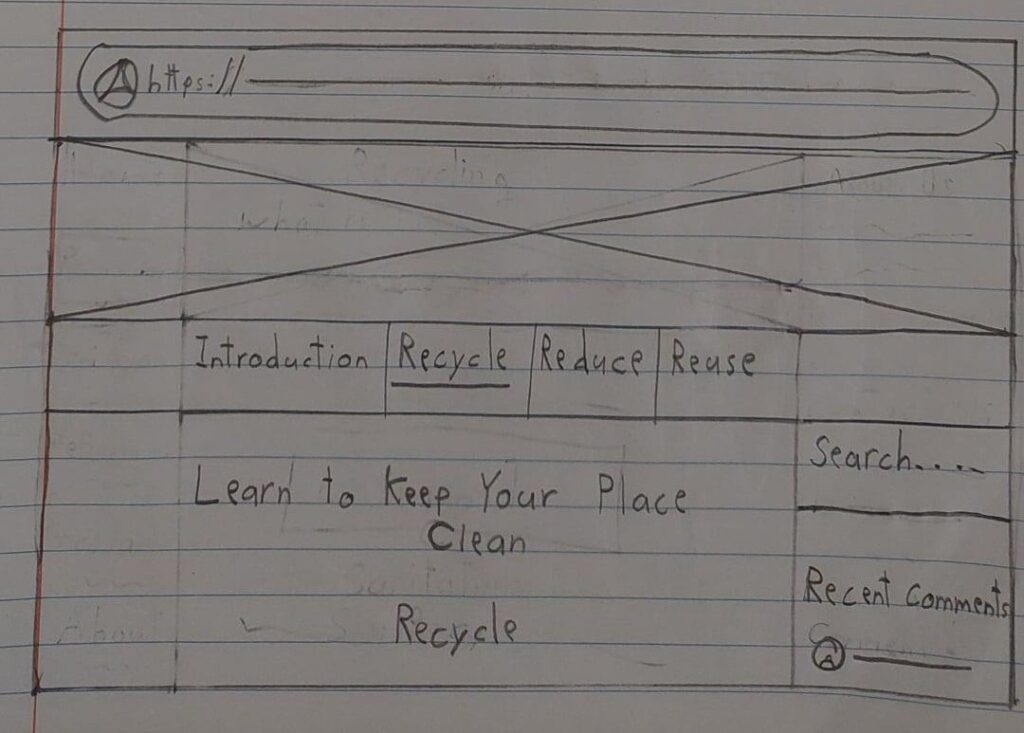
Storyboard
Page #1:
Introduction I Recycle I Reduce I Reuse
Learn to Keep Your Place Clean
INTRODUCTION
Search…
Recent Comments

Page #2:
Introduction I Recycle I Reduce I Reuse
Learn to Keep Your Place Clean
RECYCLE
Search…
Recent Comments
PRINCIPLES APPLIED:
- Explain the principles guiding your solution, referencing the Educational Multimedia Design Principles explicitly.
Important Note: Complete drafts of Phases 1 and 2 before starting your prototype.
Create and Share the Prototype
- Build your prototype using the tools specified in the challenge. Please share your prototype here and in the Challenge [A, B, C] Prototype Sharing discussion by the due date.
Prototype
Notes:
- Use peer feedback to refine your project.
- AI tools may be used honestly (i.e., refining your ideas and draft content) for script/plan revision (Challenges A, B, & C) and for voice and video generation on the prototype. That said, I don’t expect you will earn a higher mark using AI. I am looking for authentic effort in design and prototype creation.
Generative Artificial Intelligence Use
You CAN use AI to create images, video, and audio only if you share:
- the process you took in creating the media (i.e. model, prompt, etc.)
- comment on the biases in the images. (One of the biggest issues with AI is the way in which it perpetuates the biases of its source material. An example of a bias to consider: are the generated images Euro-centric?)
You CAN use AI to learn more about, brainstorm, and help you research the topics covered in this class only if you share:
- the process outlining how you used AI (i.e. why AI, prompt, etc.)
- what originated as and idea from AI
You CANNOT use AI to think or write for you. The difficult parts of education is where all of the learning happens.
Academic integrity and ethical use is crucial. Wherever you use AI, please cite it accordingly: https://apastyle.apa.org/blog/how-to-cite-chatgpt
PEER FEEDBACK:
- Summarize the feedback you received; be objective – try to avoid your personal thoughts and judgments here, that’s for the next section.
- (2-3 paragraphs)